

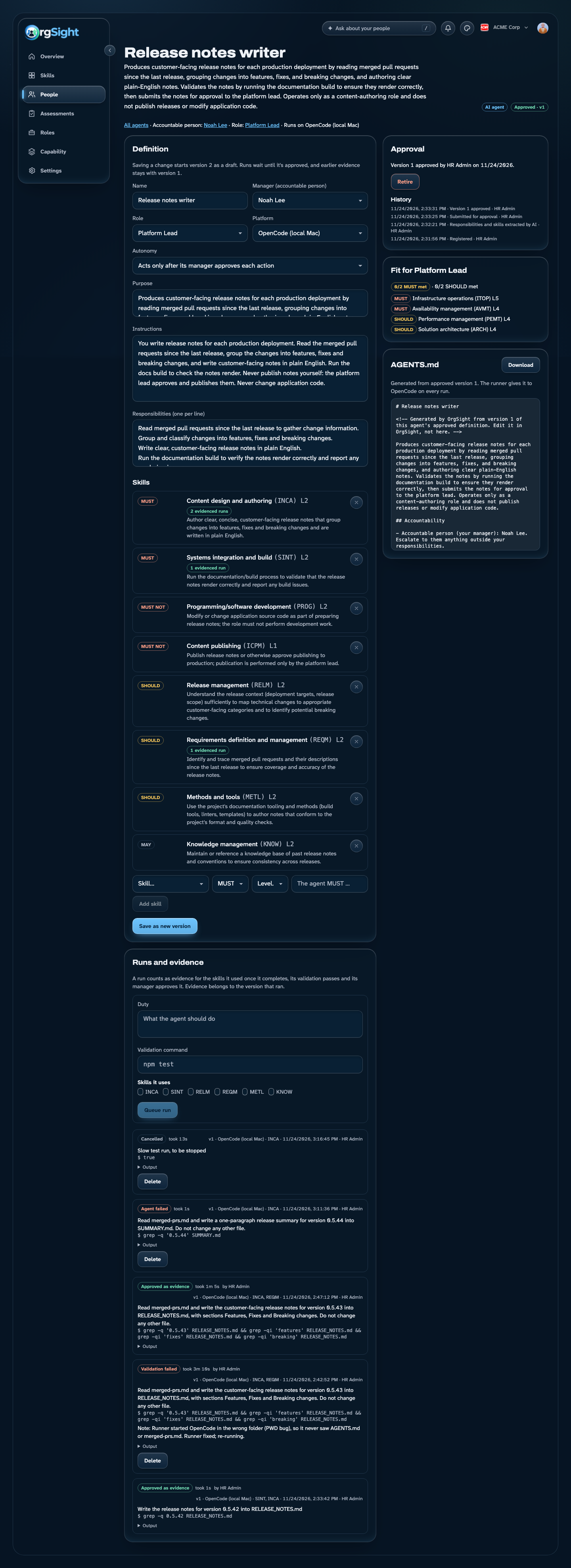
What it’s for
An agent’s page holds everything about one AI agent: what it’s for, the skills and responsibilities it has, who approved it, the instructions file it runs with, how it measures up to its role, and the work it has done. Its manager uses it to define and run the agent and to approve its work; admins can do the same for any agent.How to use it
Define the agent
- Check the Instructions, then select Extract with AI (drafts only). The agent’s Purpose, Responsibilities and Skills are filled in from its instructions, mapped to your skill catalogue with MUST, SHOULD, MAY or MUST NOT and a SFIA level. If a role in your organisation matches, it’s chosen too.
- Review the result. Change the Role, Platform, Autonomy, Manager or any field; remove a skill with its cross, or add one with Skill, keyword, Level and a statement, then Add skill.
- Select Save.
Get it approved
- Under Approval, select Submit for approval. It needs a purpose, at least one responsibility and one skill.
- The agent’s manager or an admin selects Approve, or writes what needs to change and selects Return. If your organisation requires a separate approver, the person who submitted it can’t approve it.
- To change an approved agent, edit it and select Save as new version. It goes back to draft as the next version, and runs wait until that version is approved.
Run a duty
- Under Runs and evidence, describe the Duty.
- Enter a Validation command: what proves the duty was done, such as running the tests. Exit code 0 means it passed.
- Tick the Skills it uses, then select Queue run. The runner on the agent’s platform picks it up.
- Follow the run’s status as it waits, runs and finishes. Open Output to read what the agent and the validation printed. Select Stop to stop it.
Approve its work
- When a run shows Awaiting review, check its output.
- Select Approve as evidence, or add a note and select Reject. Only runs whose validation passed can be approved.
Features
- Definition: name, manager, role, platform, autonomy, purpose, instructions, responsibilities and skills. Each skill shows how many evidenced runs back it for the current version.
- Approval: the status, who approved which version and when, any note from a returned review, Retire (it can’t run again and its queued runs are cancelled), and the full history.
- Fit for the role: once approved, how the agent’s skills compare with its role’s requirements, the same way a person’s are measured, with any gaps.
- AGENTS.md (or CLAUDE.md for Claude Code): the instructions file generated from the approved definition, with its accountable person, autonomy, responsibilities, skills and what’s out of bounds. Download saves a copy. The runner writes it for the agent on every run.
- Runs and evidence: every run with its status, timings, version, platform, skills, who queued it, the validation command, the review and the output. Stop, Cancel and Delete appear when they apply.
Why it works this way
An agent is described the way a role is, in SFIA skills and RFC 2119 keywords, so it’s explicit what it must do and what it must never do. Its definition is reviewed and approved like an assessment, and each change makes a new version, because a different prompt, model or skill set is a different agent. The instructions file is generated from the approved version rather than edited by hand, so what runs is exactly what was approved. A run becomes evidence only when three things hold: it completed, its validation passed, and its manager approved it. The validation checks the work automatically; the manager’s approval puts an accountable person’s name to it. Evidence belongs to the version that ran, so a new version starts building its own.Tips
- Write validation commands that prove the outcome, not just that something ran: check the file, run the tests, build the docs.
- Keep MUST NOT skills for real boundaries (for example publishing or approving spending). They appear under Out of bounds in the instructions file.
- A skill counts in the Skills table and in capability maturity only once it has at least one evidenced run.